
Camius NVR NAS Setup: How to Upload NVR Recordings to NAS Storage
A NAS (Network Attached Storage) gives your Camius NVR a flexible way to save video recordings beyond the internal hard drive. With NAS for NVR recording, you can expand storage, back up footage automatically, and access video remotely without replacing disks.
Camius IPVault NVRs (network video recorders), support NAS NVR integration through SMB/CIFS and NFS protocols. Once connected, your NVR can continuously record or back up video files to the NAS device.
Benefits of Camius NVR NAS Setup
NAS storage adds flexibility and reliability to your Camius video surveillance setup. It allows secure, scalable storage without depending solely on the NVR’s internal HDD.
Camius NAS NVR systems are ideal for users who need longer retention times, centralized management, and backup redundancy for business or home monitoring.
Supported NVR NAS Storage Protocols
SMB/CIFS Protocol for Windows NAS
The SMB (Server Message Block) protocol, also known as CIFS, is commonly used by Windows-based NAS systems.
When using SMB/CIFS, enter the NAS IP address, shared folder name, and user credentials (username and password) in the Camius NVR menu.
This method provides secure access and is ideal for NAS devices operating in Windows network environments.
NFS Protocol for Linux NAS
The NFS (Network File System) protocol is widely used by Linux-based NAS devices.
It allows the NVR to access shared folders using only the NAS IP address and directory path, without requiring login credentials.
NFS typically offers faster performance on local networks and is preferred for stable, continuous video recording.
Requirements Before Adding NAS for NVR Recording
- NAS and NVR must be on the same local network (LAN).
- Create a shared folder on the NAS with read/write permissions.
- Note the NAS IP address, directory path, and login credentials (for SMB).
- Use a wired Ethernet connection between the NVR and NAS for stable transfer speeds.
Step-by-Step Camius NVR NAS Setup Guide
You can connect your Camius NVR to a NAS (Network Attached Storage) for additional video storage through Device → Disk → Add NetHDD.
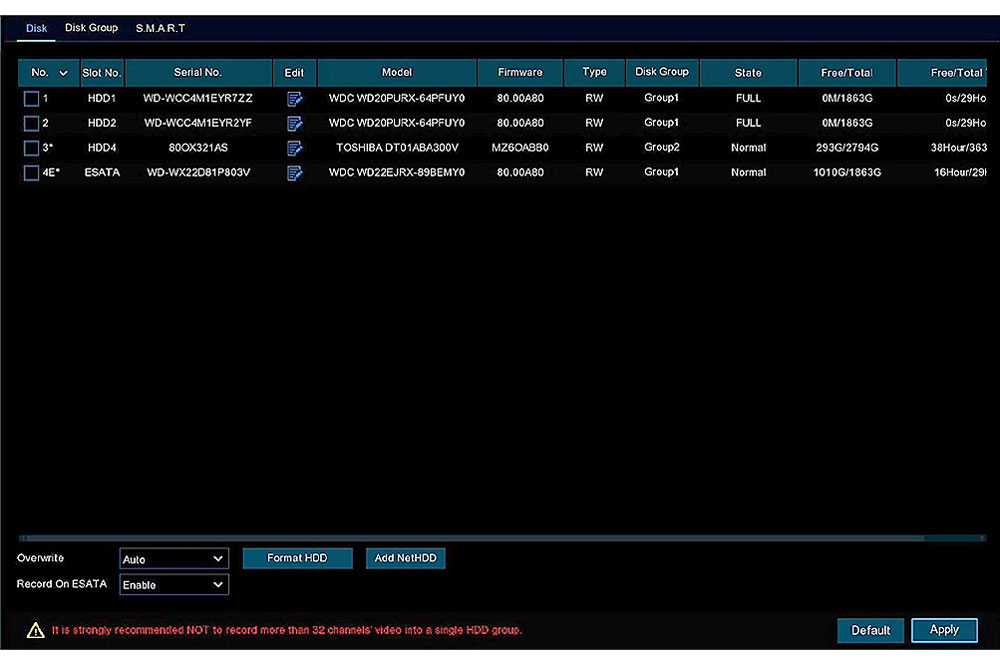
Access the NAS Configuration Menu
- Log in to your NVR (followed by Remote Setting if you are accessing the NVR’s web client) → Storage → Disk.
- Click Add NetHDD.
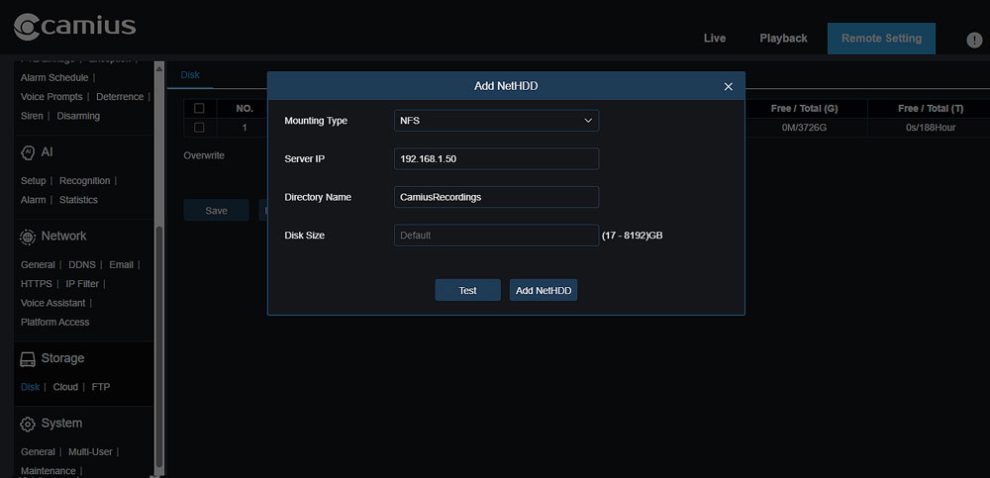
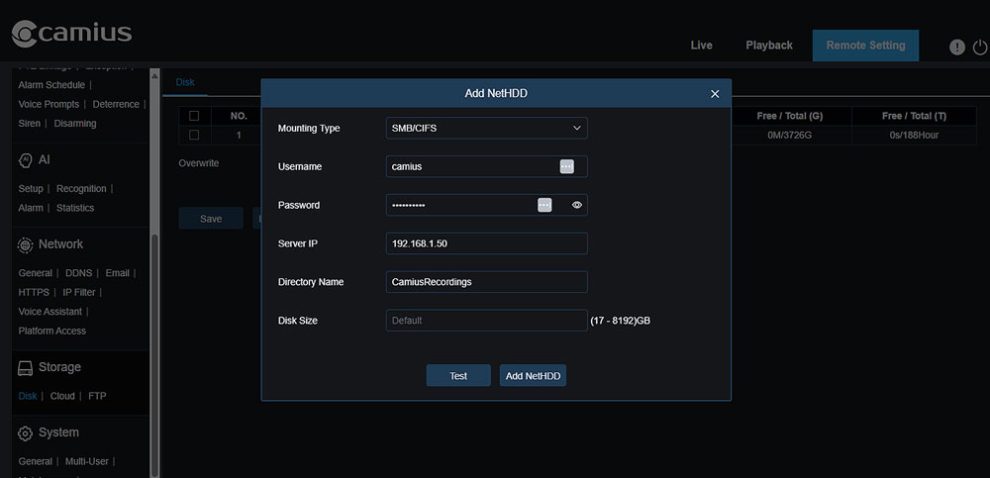
This opens the “Add NetHDD” dialog window where you can select the mounting type and enter network details.
Choose the Mounting Type
- Select one of the supported protocols under Mounting Type:
- NFS – For Linux, Synology, or QNAP NAS setups (no username/password required).
- SMB/CIFS – For Windows or mixed-environment NAS (requires login credentials).
Enter NAS Connection Details
The following fields appear, identical to those shown in your screenshots:
- Username: Enter the NAS account name (only for SMB/CIFS)
- Password: NAS account password (only for SMB/CIFS)
- Server IP: IP address of the NAS device on your local network
- Directory Name: The shared folder or exported NFS path on the NAS [ e.g. CamiusRecordings (for SMB) or /volume1/CamiusRecordings (for NFS)
- Disk Size: Leave as Default unless you must assign a quota.
Test and Add NAS Storage
- Click Test to verify the connection.
- If the connection fails, check your NAS permissions or network settings.
- Once the test passes, click Add NetHDD to mount the NAS.
- The NAS drive appears in the Device → Disk list together with local HDDs.
- Its Status column shows Normal, Unformatted.
- A Normal status confirms that the NAS is connected and ready for recording.
Important NAS Storage Notes
- AI-related data, voice prompts are stored only on the local HDD
- NAS serves as extended or backup recording storage.
- Always connect your NVR and NAS through a wired LAN to maintain stable data flow.
- If you later delete or rename the NAS folder, recordings will fail until re-added.
FAQs About Camius NVR NAS Setup and Recording
Can I use NAS for NVR recording without an internal HDD?
No. You need to have an internal hard drive for proper system operation. The NAS can be used as extended or backup recording storage, but essential data such as the AI database, voice prompts, system data, indexing are stored only on the local HDD.
Which NAS devices are compatible with Camius NVRs?
Camius NVRs work with NAS supporting SMB or NFS.