
Business Surveillance System with Sound Detection and Audio Recording
A business surveillance system with sound detection records more than video. Built in microphones and smart sound detection capture motion and sound triggered events with precise time and date stamps. Camius PoE NVR and hybrid analog DVR camera systems support 24 7 recording, event search by sound or motion, remote remote access, and no monthly fees. Designed for offices, warehouses, retail stores, and commercial properties, these systems deliver reliable local storage, NDAA compliant hardware, and free shipping across the US.
Security Camera with Sound Detection for Business
A sound detection camera monitors audio through its built-in microphone. When the noise level rises above your set threshold, the recorder automatically starts video recording and can trigger alerts.
Each sound event includes a fixed 5-second pre-record period before the trigger, followed by the post-recording duration you select (up to 5 minutes). This ensures you capture the moments leading into and following an event.
Learn more about recording settings:
View Camius Cameras with Sound Detection
Shop Camius PoE NVR Camera systems
How Sound Detection Works in Commercial Security Cameras
Enabling Sound Detection
On the Hybrid DVR or PoE NVR local interface (HDMI):
Setup >> AI >> Setup >> Sound Detection
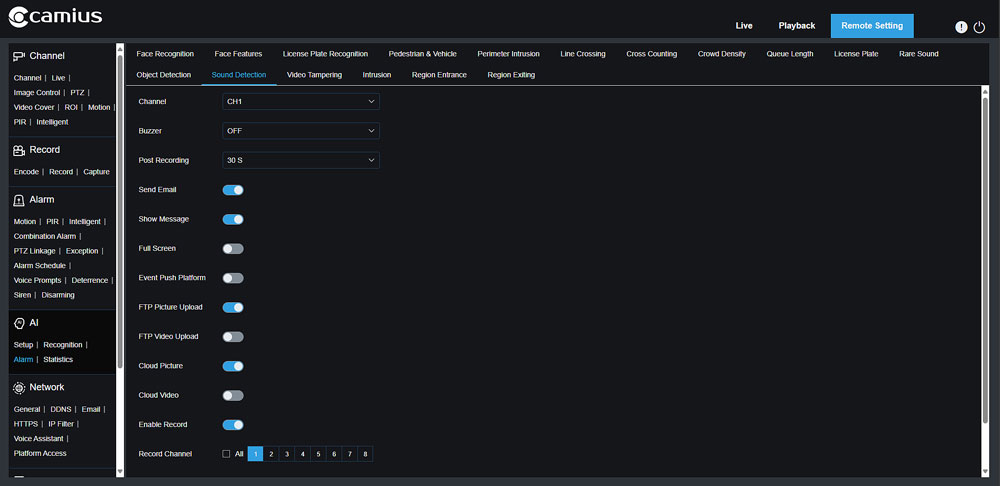
In the web browser
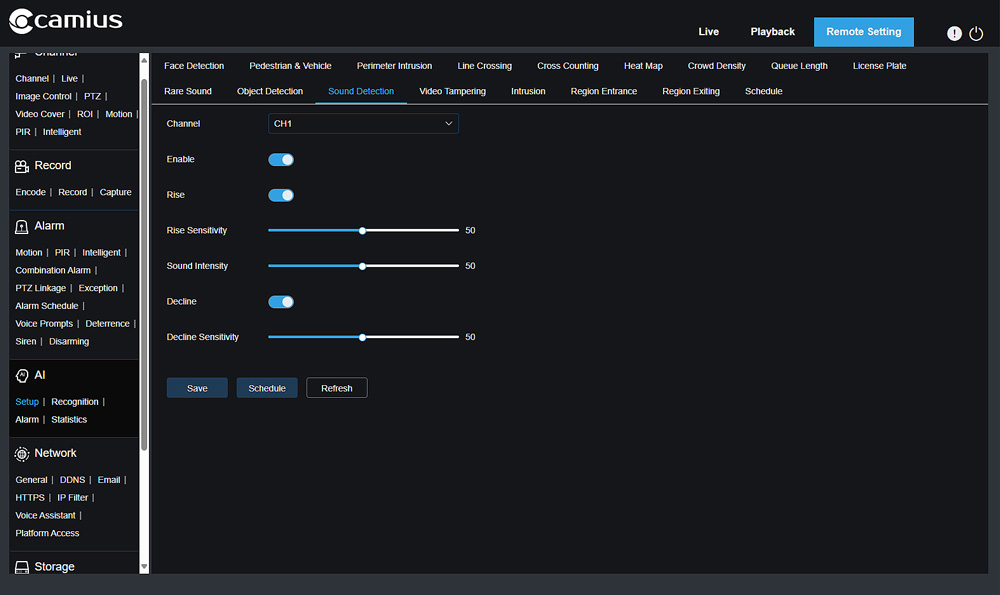
- Enable and tune detection under: Remote Setting >> AI >> Setup >> Sound Detection
- Configure alarm actions under: Remote Setting >> AI >> Alarm >> Sound Detection
Main settings include
- Sensitivity: Controls how easily sound triggers recording
- Sound Intensity: Defines the detection threshold; lower values detect quieter sounds
- Schedule: Select the hours or days when detection is active
- Actions: Choose to record, send email notifications, show on-screen messages, or upload to FTP/cloud storage, post-recording up to 5 minutes.
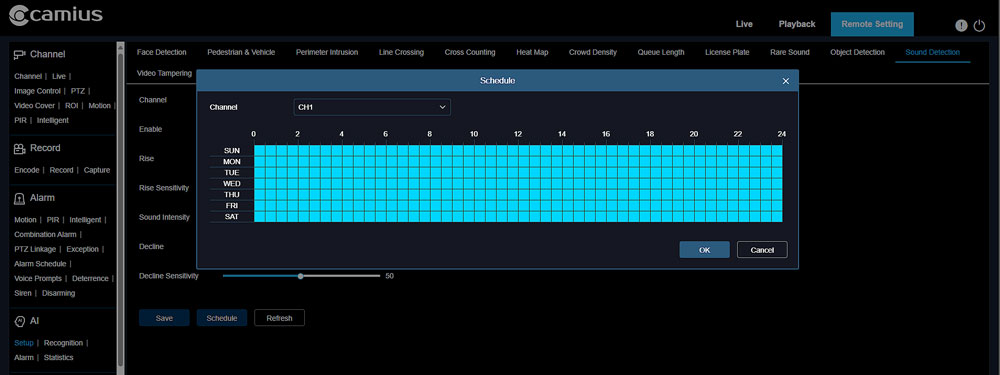
Set the Schedule
- In AI >> Setup >> Sound Detection, click Schedule.
- The grid uses 30-minute blocks. Blue is active. Black is inactive.
- Pick days and hours for sound detection to run.
- Use Copy to apply the same schedule to other channels if needed.
PoE NVR and Hybrid DVR Systems with Audio Support
Sound detection is supported on the following:
- PoE NVR camera systems when used with Camius IP cameras that include built-in microphones
- PoE dome camera systems with audio support
- Hybrid DVRs when used with Camius IP security camera with sound detection that include built-in microphones
Shop Business Surveillance Systems
Order Now:
- PoE NVR Camera Kits
- PoE Dome Camera Systems
- IP Camera Systems
- Camius IP Cameras with Built-in Microphones
Camius PoE NVR Bundles
Available in 8-channel and 16-channel configurations for flexible commercial installations.
Quick Setup for Installers
- Go to AI >> Setup >> Sound Detection on the local HDMI interface
- Select the channel and enable the feature
- Adjust Sensitivity and Sound Intensity
- Set the schedule for active hours
- If you are not connecting an HDMI monitor to the recorder and using a web browser to manage your cameras settings, navigate to Remote Setting >> AI >> Alarm >> Sound Detection, choose actions such as recording and notifications
- Set post-recording duration (up to 5 minutes)
Testing Tip:
Clap or make a noise near the camera to confirm event detection and check that playback includes both pre- and post-recording.
Industries That Use Sound Detection Surveillance
Warehouses and Distribution Centers
In warehouses and distribution centers, a sound detection surveillance system records audio triggered events in real time. Loud impacts, equipment noise, alarms, or abnormal activity are captured alongside video. This enhances video evidence with sound context, which is critical for incident review and internal reporting. Compared to motion only detection, audio based triggers help reduce false alarms caused by lighting changes, dust, or moving machinery. Systems support local hard drive storage, email alerts, and AI event logs for efficient investigation.
Retail Stores and Offices
Retail stores and office environments benefit from CCTV sound detection features that capture raised voices, glass break sounds, or other unusual noise. A noise detecting camera provides additional context beyond standard video, helping managers verify disputes, theft incidents, or after hours activity. By activating smart motion and sound detection, the system filters irrelevant triggers and improves event accuracy. Recorded footage is stored locally and searchable by event type, with optional email notifications for critical alerts.
Commercial Buildings and Industrial Sites
Commercial buildings and industrial sites require reliable monitoring of both movement and abnormal sound. Sound detection surveillance systems detect and record audio triggered events while maintaining continuous 24 7 video coverage. This layered detection reduces false positives and improves response time. AI event logs, local storage, and remote access allow facility managers to review time stamped incidents quickly and export evidence when needed.
FAQs About Security Camera with Audio Recording and Sound Detection
I need a camera that detects and then records audio
Camius IP cameras with built-in microphones detect sound and record video with audio when noise exceeds a set threshold. This sound detection camera feature is available in Camius PoE NVR and Hybrid DVR systems. The recorder saves the event with a fixed 5-second pre-record and up to 5 minutes of post-recording.
Can security cameras detect sound?
Yes, if the camera includes a microphone and supports AI-powered sound detection, which allows recording and alarms to be triggered by sound. Camius security cameras with sound detection continuously monitor audio levels. When noise exceeds the threshold you set, the system records video and can send alerts. Cameras without a built-in microphone only detect motion and do not respond to sound.
How to tell if security cameras have sound
Check the camera’s specifications or label for terms like “built-in microphone,” “audio input,” or “two-way audio.” On Camius models such as the IRIS528R, the mic hole is visible on the front housing. You can also open the NVR’s channel settings—if the Audio Enable option appears, the camera supports sound.
How to tell if a camera has audio recording
If a camera has a microphone and audio is enabled in the NVR or web interface, it records both video and sound. In Camius systems, open Setup >> Channel >> Encode and confirm Audio Enable is turned on. During playback, the speaker icon in the toolbar indicates that recorded sound is available.
Do business security cameras record sound?
Yes, business security cameras record sound when they include a built in microphone and audio recording is enabled in the system settings. In Camius PoE NVR and hybrid DVR systems, audio and video are recorded together and stored on the local hard drive. Audio recording must be activated per channel under the encode settings. Cameras without microphones will record video only.
Can I search playback by sound event?
Yes. When sound detection is enabled, the system logs audio triggered events with time and date stamps. You can filter playback by event type, similar to motion detection filtering. This allows you to jump directly to recorded sound events instead of manually scanning continuous footage.
Do Camius systems require monthly fees?
No. Camius surveillance systems use local hard drive storage inside the NVR or DVR. There are no required monthly cloud storage fees. Remote access through the Camius View app is included, and recorded footage remains under your control on your local device.
Is audio recording legal in commercial buildings?
Audio recording laws vary by state and jurisdiction. In the United States, some states follow one party consent rules, while others require all party consent for recorded conversations. Business owners are responsible for complying with local, state, and federal regulations before enabling audio recording. Many commercial properties post visible notice that video and audio recording is in use to remain compliant.