
Choosing a security camera system isn’t just about high-definition video—it’s also about how safely that audio video footage is stored. With more businesses and homeowners concerned about unauthorized access, security camera storage has become just as important as the cameras themselves. Camius provides a layered defense for protecting footage on their PoE and wireless NVRs (network video recorders), hybrid DVRs (digital video recorders).
Local Storage Security at the Core
For many users, local storage security is a priority because footage is stored on-site instead of in the cloud. Camius secures this storage using password protection, and physical safeguards to make sure your footage remains private even if devices are stolen or tampered with.
Password Protection and User Accounts
Every Camius device requires strong, unique passwords. Administrators can also set up multiple user accounts with customizable permissions—ensuring that only trusted individuals can view or manage footage. This user access control is especially valuable for businesses, public establishments, where employees may need limited access but not full administrative rights.

Data Encryption
Camius protects security camera storage with encryption that follows industry standards. Footage is encrypted both at rest (when saved on local storage) and in transit (when transferred over a network). This means even if someone gains access to the files, the video cannot be read without the right login and permissions.
By following standards recommended by the National Institute of Standards and Technology (NIST), Camius ensures that its systems meet the same level of protection used across modern industries. This keeps your local storage security strong and your video data private.
NVR Security Systems and Storage
Network Video Recorders (NVRs) are the backbone of many modern surveillance setups. Because NVRs connect directly to a network, NVR security systems and storage must be protected against remote threats. Camius strengthens NVR protection with industry-standard encryption, secure Wi-Fi protocols like WPA2/WPA3, MAC address filtering, and the option to disable remote management. These steps keep both live streams and stored footage safe from unauthorized access. Explore Camius NVR Security Camera Systems
DVR Security Systems and Storage
Digital Video Recorders (DVRs) are common in traditional or hybrid security systems. Even though they rely on coaxial connections, DVR security systems and storage still face risks if not properly secured. Camius DVRs include password protection, encryption, and audit logs to ensure stored video is protected. While NVRs typically offer more advanced AI and remote features, both DVR and NVR storage benefit from Camius’s multi-layered approach to security. Shop Camius Analog DVR security camera systems
Audit Trails and Logs
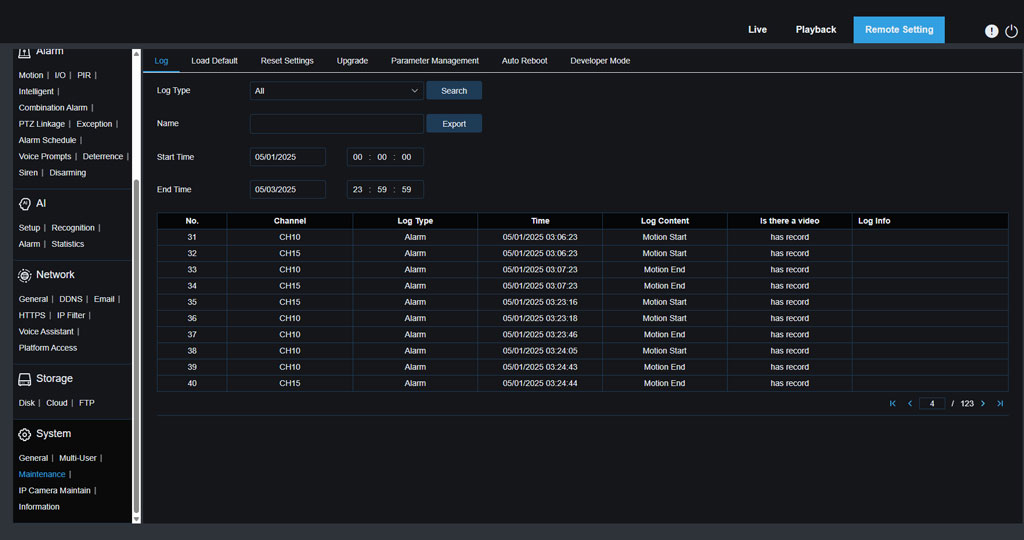
Camius devices record detailed system logs of user activity and login attempts. These audit trails let administrators monitor who accessed footage and help detect suspicious behavior early. Logs are one of the best tools for responding to potential breaches, as recommended by the Cybersecurity & Infrastructure Security Agency (CISA).
Regular Firmware and Software Updates
Threats evolve constantly, which is why Camius pushes regular firmware and software updates. Updates patch vulnerabilities and enhance protections, ensuring systems stay secure against new exploits. Following CISA’s guidance on updates is an easy but powerful step to reduce risks.
Physical Safeguards
Because security camera storage hardware is typically kept on-site, protecting devices from physical tampering is just as important as digital defenses. Some Camius systems support lockable chassis, and proper installation practices—such as securing NVRs or DVRs in locked rooms—provide another layer of safety.
Quick Revocation and Real-Time Alerts
Administrators can instantly revoke user permissions. Real-time alerts powered with AI (artificial intelligence) are essential in preventing crimes and stopping intruders.
FAQs about Security Camera Footage
Can I set user permissions for local storage?
Yes. Camius systems allow administrators to create user profiles with specific permissions. You can limit access to live viewing, playback, or system settings based on the user’s role. This is especially useful for businesses that need to balance operational access with privacy and security.
A Multi-Layered Approach to Security Camera Storage
From local storage security to NVR security and DVR security, Camius combines encryption, user management, audit logs, network protection, and physical safeguards. This multi-layered approach ensures that your security camera storage remains protected against unauthorized access while keeping your footage reliable and private.