
The beeping sound from the DVR or NVR indicates that specific alarms have been enabled and is accompanied by the internal buzzer sound of the recorder. You can easily stop the NVR beeping sound by following the steps provided.
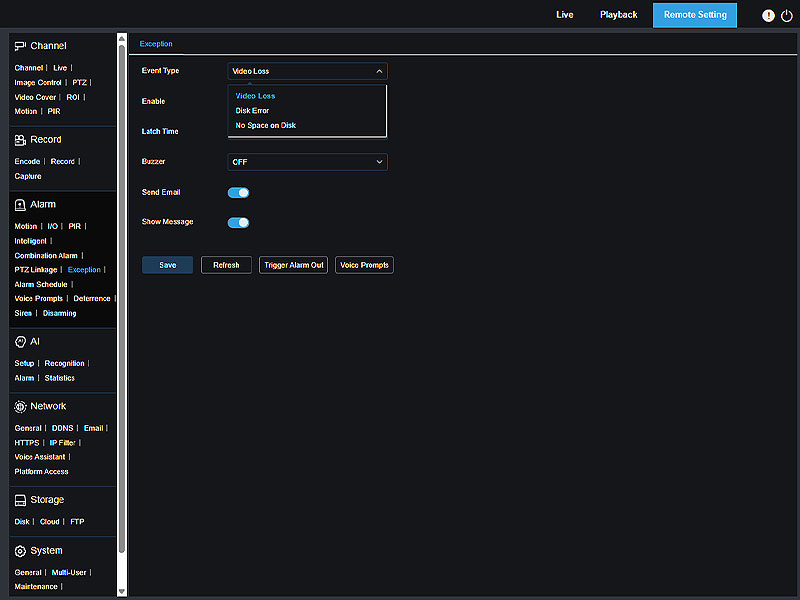
The beeping sound from the DVR or NVR indicates that specific alarms have been enabled and is accompanied by the internal buzzer sound of the recorder. You can easily stop the NVR beeping sound by following the steps provided.

Learn how to set up NVR recording to the cloud with Camius DVR and NVR systems. Safely store and access surveillance footage using Dropbox or Google Drive. Enable automatic uploading triggered by motion or other events. Follow our step-by-step guide for a seamless setup. Enhance your security and have your important recordings readily available whenever you need them.
If you forgot your recorder’s password, there are two ways to reset it. 1 – If your recorder has a reset button, press and hold it for 10 seconds; you will hear an audible confirmation. This will reset all settings, including the password, but will not erase recorded footage on your hard drive. 2 – If […]

You can play recorded CCTV footage that match recording schedule, manual recordings, or events only. Camius Backup function allows you to save important events, including both audio-video recordings and snapshots, to a USB thumb drive.

Setting the correct date and time on security DVR, NVR Recorder is crucial for accurate video recording and playback I Camius

Is My NVR or DVR Recording. How to Set Up Security Camera Recording For a DVR or NVR to record video, a hard drive must be installed and detected by the system. When a Camius DVR or NVR is purchased with a pre installed hard drive, continuous recording in Normal mode is enabled by default. […]
Camius security camera system can really help protect your home or business better than old ones. Stuff is always changing, so your camera setup probably needs updating too. Upgrading is important whether you live in a house or own a business.

A Motorized lens IP camera is The camera with a motorized varifocal lens that can automatically adjust the camera’s focal length, getting a clear auto-focused picture. The manual varifocal lens requires you to adjust the varifocal lens manually. It is a time-consuming process.
Understanding the difference between NVR vs DVR, will help to get a better decision on what security system suits your requirements and feasibility as it involves certain camera wiring.
A PoE camera means an IP camera that powers up using power-over-ethernet technology.