
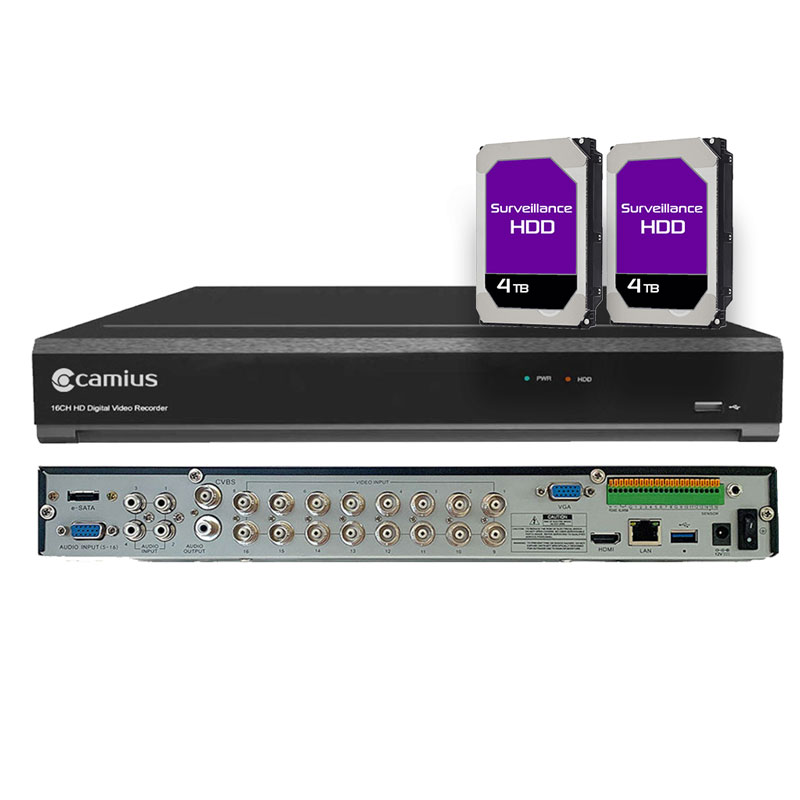



Upgrade to Camius Hybrid Security DVR Recorder
With the Camius Professional 4K DVR 16 Channel (digital video recorder), you can view and record up to 24 HD security cameras. In addition to supporting 16 analog surveillance cameras over coax, you can add up to 8 HD IP cameras. This surveillance DVR is the most effective hybrid surveillance solution for any business due to its high bandwidth and 4K capabilities. Using a browser, video management software for PCs and Macs, or Camius View, you can access this advanced DVR anywhere in the world.

Professional Hybrid DVR 16 Channel Surveillance Recorder
The Camius Professional 4K 16 Channel DVR (digital video recorder) is a highly advanced surveillance system for large home and business applications. It can view and record up to 24 HD security cameras at a high bitrate, making it an excellent choice for businesses that require extensive surveillance capabilities.
In addition to supporting 16 analog surveillance cameras over coax, this DVR can accommodate up to 8 HD IP cameras. With its high bandwidth and 4K capabilities, the Camius Professional 4K 16 Channel DVR offers the best of both worlds regarding analog and IP camera support.
The Camius Professional 4K 16 Channel DVR is an advanced surveillance system for large home and business applications. It supports up to 24 HD security cameras and offers high bitrate recording, perfect for businesses with extensive surveillance needs. This DVR accommodates 16 analog cameras and up to 8 HD IP cameras, combining analog and IP camera support effectively. Its remote access capabilities allow you to monitor your premises from anywhere using a browser, PC/Mac software, or the Camius View smartphone app, ensuring constant surveillance even when you’re away.
Compatible Surveillance Cameras
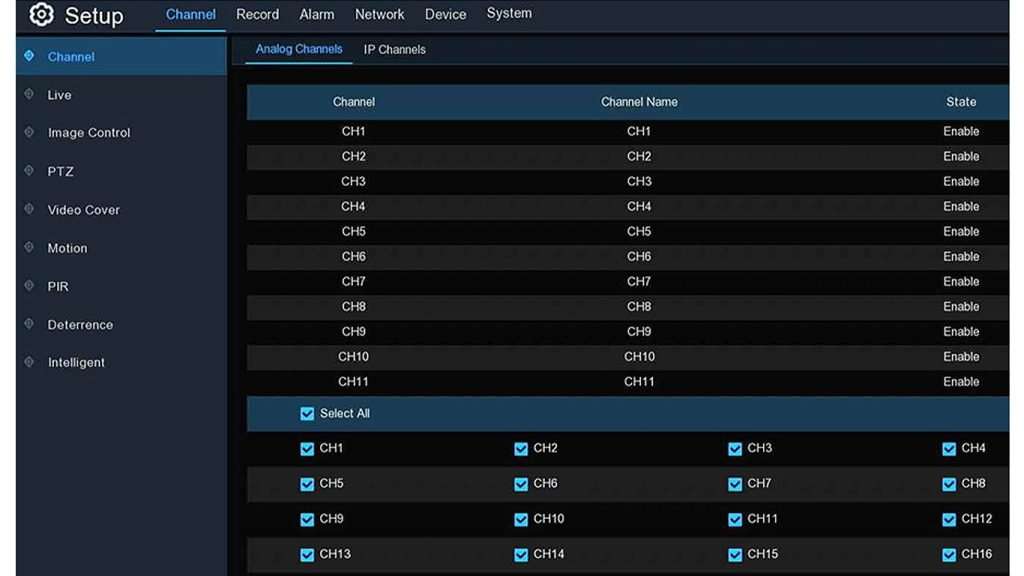
This 4K XVR supports up to 16 analog CCTV cameras. CVBS, AHD, HD CVI, and HD TVI cameras (up to 4K video resolution) are compatible with the DVR. In addition to analog cameras over coax, the 4K Hybrid DVR works with IP network cameras. The security recorder supports up to 24 HD channels in XVR mode. Camius IP cameras are recommended since the Camius DVR recorders are optimized for plug-and-play setup, functionality, and features. Non-Camius IP camera compatibility and features may be limited.
Analog Camera Channels convertible to IP
The total default bandwidth is 64 Mbps. Converting all analog channels to IP channels will increase the maximum bandwidth to 192 Mbps. By decreasing one analog channel, you can increase bandwidth by 8 Mbps. Add 16 analog and 8 IP channels to the Camius surveillance digital video recorder.
Camius IP (network) cameras are recommended for full functionality; 3rd party IP camera support may be limited to basic video and motion detection features. Camius IP cameras for the DVR are easy and offer advanced features. Follow this how-to guide about adding IP cameras to Camius DVR.
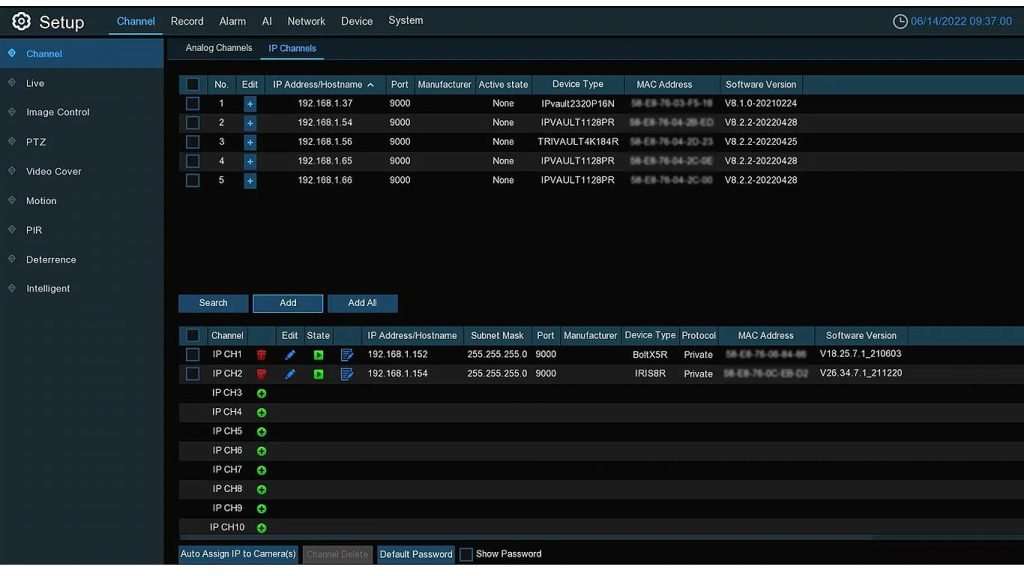
Camius IP (network) cameras are recommended for full functionality; 3rd party IP camera support may be limited to basic video and motion detection features. Camius IP cameras to the DVR are easy and offer advanced features. Follow this how-to guide about adding IP cameras to Camius DVR.
16 Channel DVR with Hard Drive 8TB Storage
The 4K Professional Security DVR for security cameras fits 2 internal SATA hard drives with a capacity of up to 14TB each. In addition, the 4K DVR has an e-SATA port for an external hard drive maximum capacity of 14TB. We offer a detailed guide with steps to install internal hard drives. This DVR has two 4TB hard drives pre-installed with a total 8TB capacity.

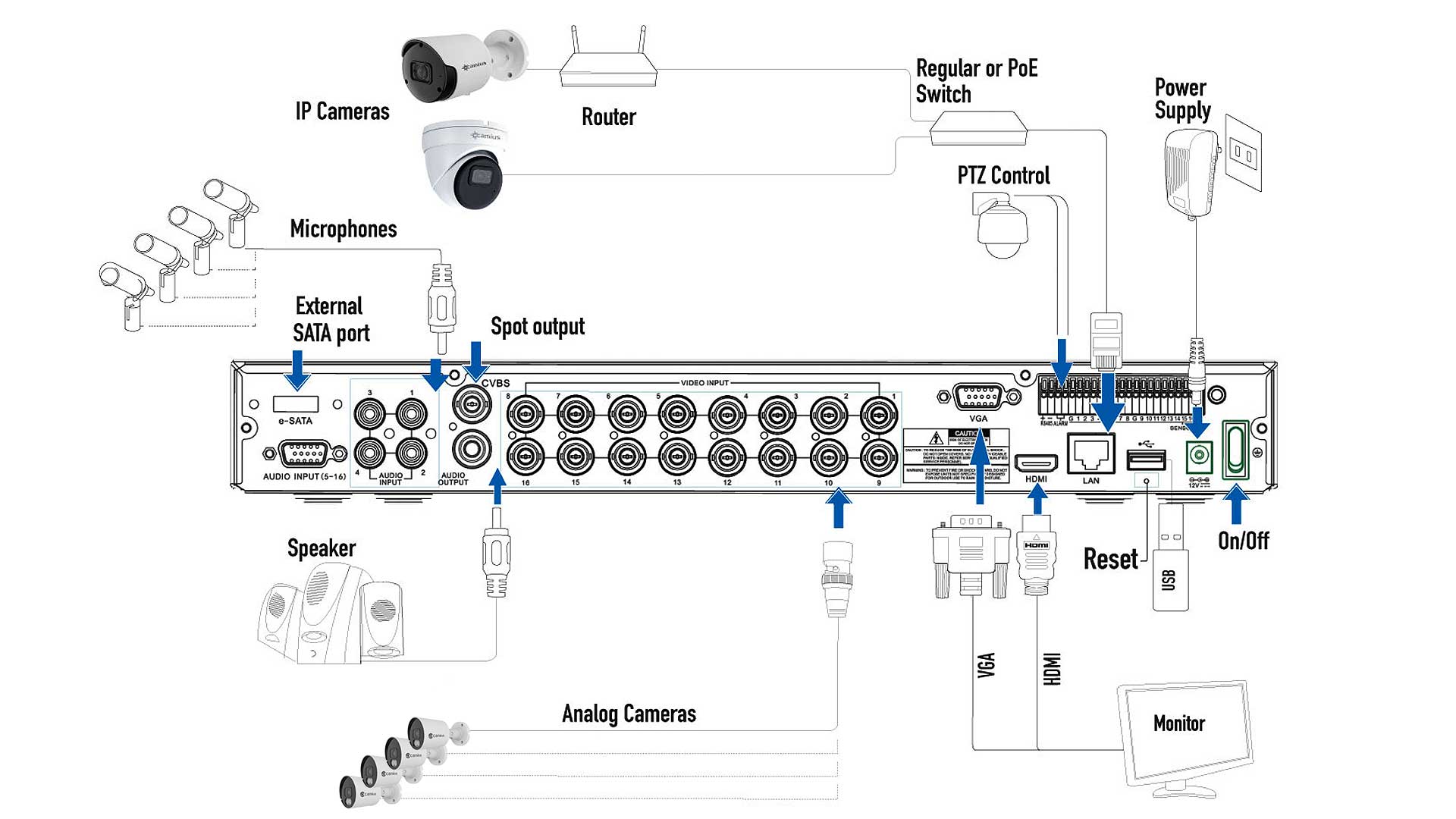
DVR Recorder with 3 video outputs
Camius 4K DVR comes with 3 video outputs to add a monitor or TV for live viewing.
- 1 x HDMI output which supports 4K video (3840×2160)
- 1 x VGA output that supports 1080P video (1920×1080)
- 1 x CVBS (or BNC) for the spot monitor to call out a certain camera.

Security Camera DVR Ports
- RS485 for adding a Pan Tilt Zoom camera (PTZ)
- WLAN, DHCP, PPPOE, DNS, DDNS, RTSP, HTTPS, and P2P protocols
- RJ-45 port (100/1000M)
- Audio 16 inputs, one output
- Alarm I/O with 16 inputs, one output
Professional Security DVR with 4K Recording
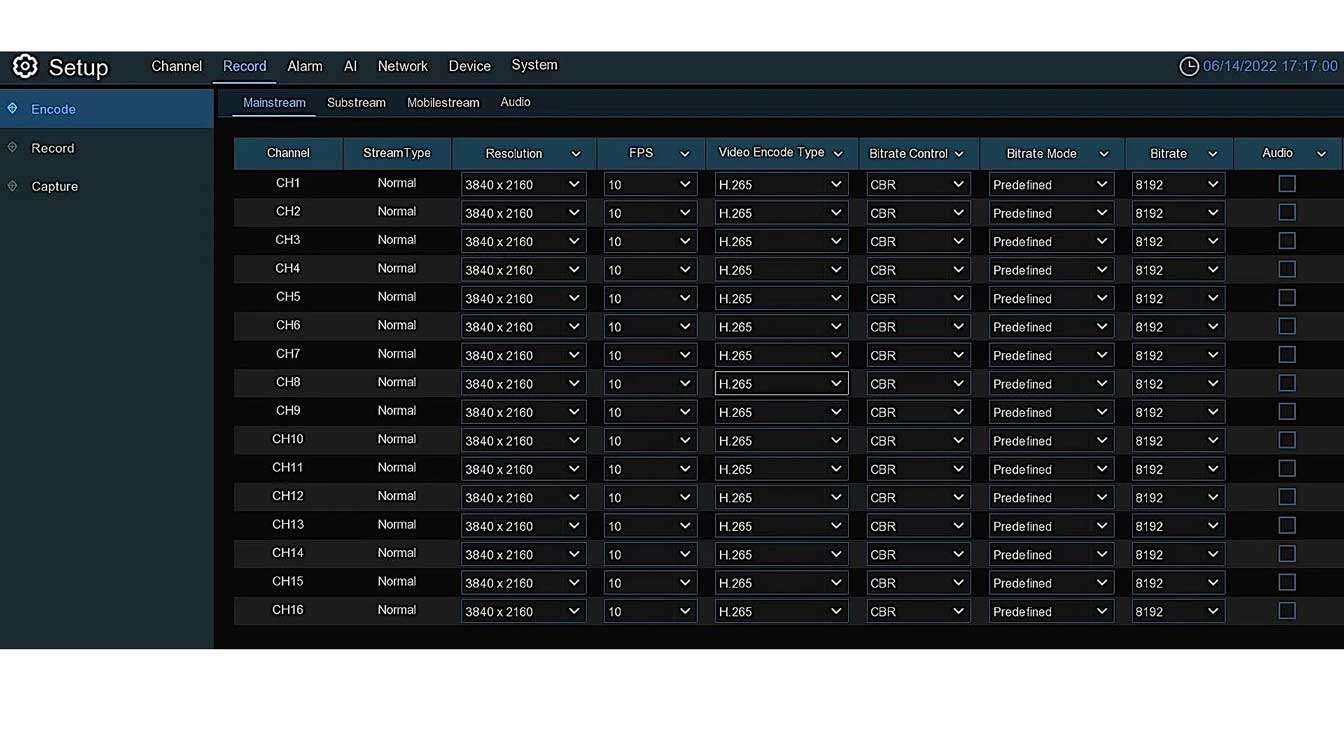
The security DVR supports the recording of analog channels in 4K (8MP 8 megapixels which is 8 million pixels) with 10 frames per second (fps) and IP at 1 to 30 fps (depending on the IP camera capabilities, e.g., SPOT828A-R IP camera). You can even control audio settings.
Receive Email Notifications
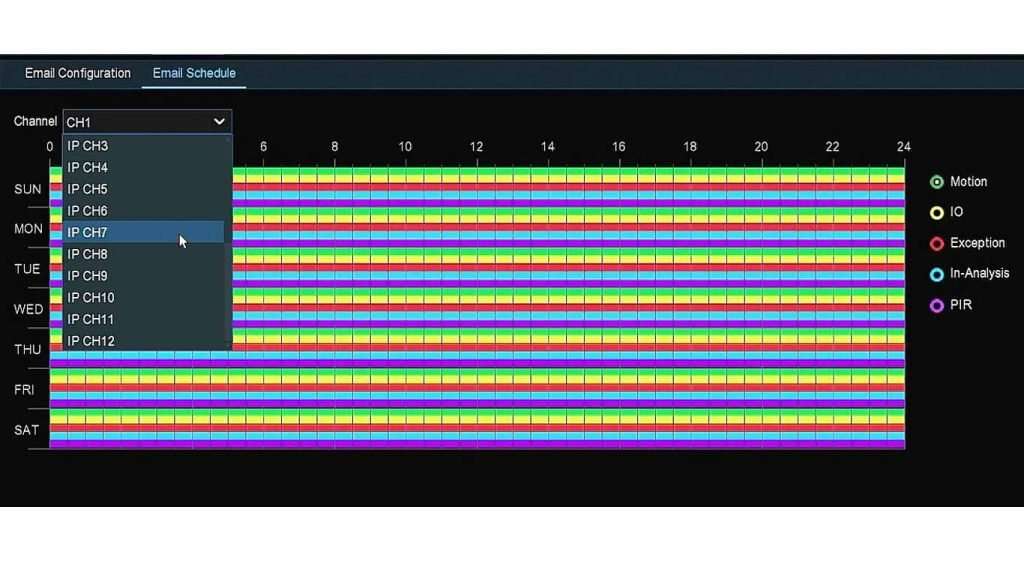
You can enable motion, intelligence, or AI detection to trigger sending email notifications.
User Management
Camius DVRs offer advanced user management features that allow users to customize and control access to their surveillance system. With Camius DVRs, you can create multiple user accounts. This feature ensures that only authorized users can access the system, preventing unauthorized access and potential security breaches.
In addition to creating user accounts, Camius DVRs also offer different levels of access to the system. The administrator has full control over the system, including creating and deleting user accounts, changing system settings, and viewing recorded footage. Other users can be granted restricted access, limiting their ability to modify the system’s settings or view certain footage.

Security DVR that works with Google Drive, Dropbox and more
- You can enable recording videos or pictures triggered by your alarm events to Dropbox or Google Drive. Follow the guide available at this link
- Time-lapse recording (controlled by the Capture feature)
- Playback search with Date/Time, Event List, Smart Search
- Privacy Zone set up
- System Auto-reboot
- Restore to default settings
- Set the menu timeout or turn it off completely (follow this guide)
- Remote access using a browser. You can adjust the web session timeout following the DVR’s menu path: Setup – System – General – Web Session Timeout

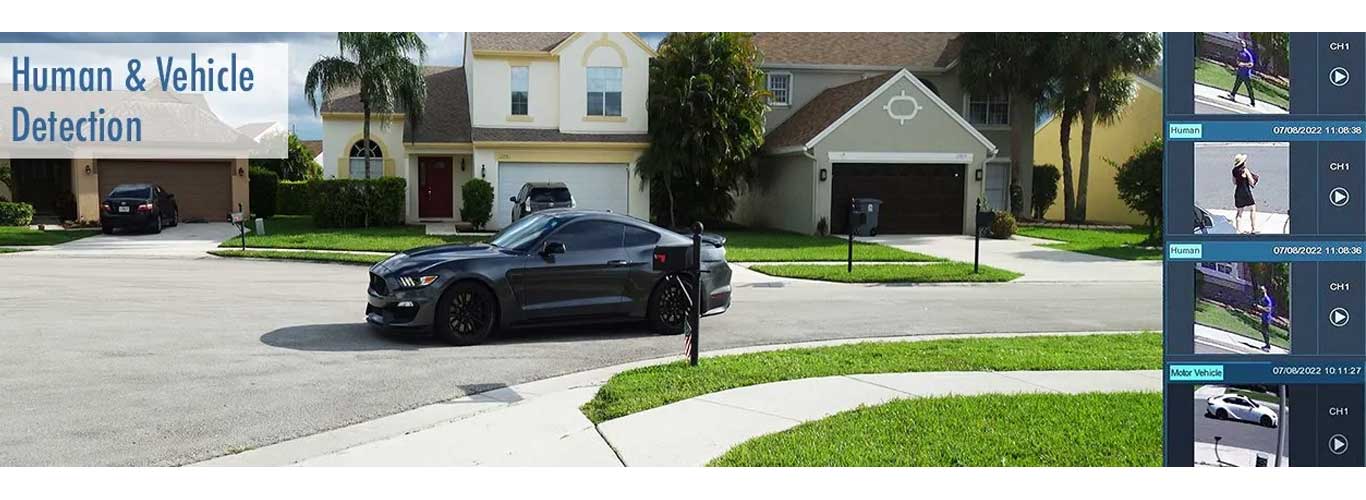
Vehicle, Human, Line Crossing detection and more in AI mode
This DVR for security cameras offers smart and AI enabled detection. This goes beyond video motion detection, allowing the user to create zones for detecting movement patterns, objects, locations, sounds, etc. These events will trigger alarms, such as emails and push notifications. showing you a message on a monitor connected to the DVR recorder, in addition to video recording in a special color and tag. You can enable it for analog and IP cameras.
Tamper Detection (Video Tampering)
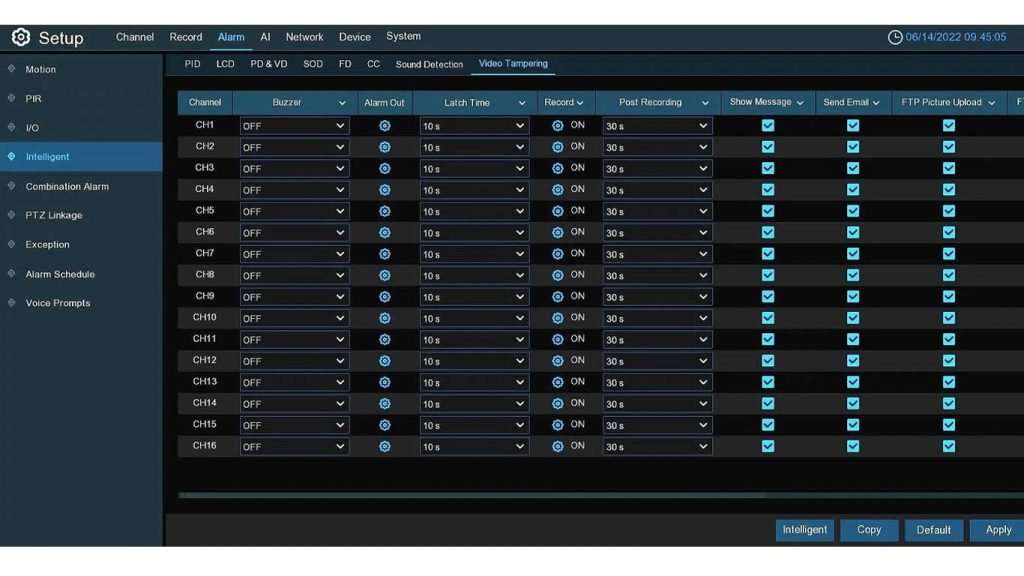
Video tamper detection is required in installations exposed to possible tampering or vandalism. This feature detects a sudden moving object in front of the lens; this indicates that someone is tampering with the camera up close. When tampering is detected, a notification is sent to the user, and the Camius DVR will tag the recording with a date and time stamp. Camius analog cameras support this function.
DVR software for Windows, Mac and Web Browser Access
Camius security systems go beyond the HDMI monitor and smartphone app. The free DVR software can turn any desktop, laptop, PC, or Mac into a 24/7 surveillance station. Users can monitor live video and audio streams in addition to playback and manage cameras with access to device settings. This software is great for multiple installations as it combines cameras connected to a Camius DVR and individual Camius cameras on one screen. The software can display multiple cameras on the same screen and manage multiple devices from different locations.
Camius DVR works with web browsers such as Edge, Google Chrome, Firefox, Safari, Opera, click here for the guide
The Smartphone Security Camera App
Camius View offers complete access to your cameras from any location.
The mobile app is available on iOS and Android App stores and is ready to link to your security cameras. You can use your smartphone security camera App to view and playback any Camius security camera; listen to audio.
What’s in the box:
- 16 Channel DVR with two 4TB hard drives (model: Trivault4K2168R 8TB HDD)
- Power supply, HDMI cable, network cable, audio cable, USB mouse, quick setup guide, screws for the security digital video recorder’s chassis, and internal hard drive installation.
- Note: Cameras are not included in this offer
Camius 16 Channel DVR Technical Information
Model: TRIVAULT4K2168R
Video & Channel Configuration
- Total Channels in Hybrid XVR mode: 24 (supports up to 16 analog + 8 IP channels simultaneously (24 total), or 24 IP cameras when used in IP-only mode)
- Analog Channels: 16 BNC, supporting AHD, TVI, CVI, and CVBS cameras (auto-adaptive).
- IP Channels: 8 IP channels (expandable to 24 total if analog inputs are disabled).
- Total Bandwidth: 192 Mbps (Incoming 128 Mbps / Outgoing 64 Mbps)
Display & Playback
- Display Resolution:
Analog Channels (Main Stream):
- 8 MP (3840×2160): 10 fps record / 15 fps display
- 5 MP (2592×1944): 15 fps record / 20 fps display
- 4 MP (2560×1440): 20 fps record / 30 fps display
- 1080 P (1920×1080): NTSC 30 fps / PAL 25 fps record per channel
- 720 P / 960 H: 30 fps record per channel
IP Channels:
- Up to 4 K / 4 MP / 1080 P / 720 P @ 30 fps per channel
Note: Frame rate and total channel count depend on total bandwidth load across analog and IP inputs.
- View Layouts: 1 / 4 / 8 / 9 / 16 / 20 / 24 split-screen configurations.
- Auto Sequence: Supported.
- Playback:
- Search up to 16 channels simultaneously.
- Multi-channel playback supported (number of channels depends on resolution and decoding bandwidth).
- Playback speed: Fast forward/backward (2x, 4x, 8x, 16x), slow motion (1/2x, 1/4x, 1/8x, 1/16x).
Video Functions
- Channel Settings: Channel name, time display, covert (on/off).
- Image Control: Brightness, contrast, saturation, hue (for analog and IP channels).
- Privacy Masking (Video Cover): Up to 4 areas per channel.
- PTZ Control: RS-485, Preset, Cruise, PTZ Linkage.
- Auto Signal Detection: Automatically detects connected camera type.
Detection & Deterrence
- Motion Detection: Available on all analog and IP channels.
- PIR Detection: With compatible IP cameras.
- Alarm Triggers: Motion, I/O, PIR, intelligent (AI) detection.
- Deterrence: Light and siren control (with Camius spotlight 4K PoE cameras: SPOT828A-RB, SCOUT4KPTZ4X); Smart Illumination (White Spotlights) apply to FB4KPRO (4k analog outdoor camera)
Compression & Recording
- Video Compression: H.265 / H.264.
- Audio Compression: G.711A / G.711U.
- Recording Streams: Mainstream and Substream per channel.
- Recording Modes: Continuous, Motion, I/O, PIR, Schedule, Manual.
- Pre-record: 5 seconds.
- Post-record: Adjustable (10–300 seconds).
- Snapshot / Time-lapse Capture: Supported (max 1080P, interval 5s–1hr).
Alarm & I/O
- Alarm Inputs: 16 wired zones (NO/NC selectable).
- Alarm Output: 1 relay output (30V DC / 2A or 125V AC / 0.5A).
- RS-485 Interface: For PTZ control.
- Alarm Features: Motion, PIR, I/O, Intelligent, Combination Alarm, PTZ Linkage.
- Exception Alarms: Disk full, disk error, video loss, network failure.
- Notifications: Buzzer, Push notification via Camius View App, on-screen message.
- Scheduling: Fully configurable per channel.
AI & Smart Detection
- AI Functions: Human and vehicle detection, face detection, perimeter intrusion, line crossing, sound, license plate detection, etc.
- Analytics: People and vehicle counting, heat maps (when paired with Camius AI IP cameras).
- AI detection on up to 8 channels simultaneously. AI functions are mutually exclusive per channel.
Network Features
- Protocols: DHCP, PPPoE, SNMP, UPnP, HTTP/HTTPS, RTSP, P2P.
- Ports: HTTP, RTSP, Media, HTTPS.
- DDNS: Supported.
- Email Alerts: SMTP (SSL/TLS).
- FTP Upload: Supported — upload snapshots or clips from motion or alarm events to a remote FTP folder.
- Cloud Storage: Dropbox, Google Drive.
- IP Filter: Allow/Block IP addresses.
- Remote Access:
- Camius View App for iOS & Android,
- Camius VMS Software for PC and Mac.
- Browser access (HTTP/HTTPS)
- Note: The TRIVAULT4K2168R operates fully offline. Recording, playback, and export do not require an internet connection. Network and motion features can be disabled when not needed.
Storage
- Internal Drives: 2 × SATA (up to 14TB each).
- External Storage: 1 × eSATA
- Network Storage: NAS (NetHDD) supported.
- Recording Management: Overwrite and redundancy options.
- HDD Format Options:
- Format entire hard disk – erases all data (including videos, events, logs, analytics).
- Format record partition – erases videos, snapshots, logs; keeps analytic information.
- Format general partition – erases only analytic information; videos and snapshots remain.
System Management
- Users: 1 Admin + 31 User accounts.
- Settings: Device name, audio input type (base-band or coaxial), date/time, output resolution.
- Maintenance: Auto reboot, logs, firmware upgrade via USB or network.
Video Outputs
- HDMI: 1024×768, 1280×720, 1280×1024, 1440×900, 1080P, 2K, 4K
- VGA: 1024×768, 1280×720, 1280×1024, 1440×900, 1080P
- CVBS: BNC output, 704×576
Interfaces
- USB: 1 × USB 2.0 (front), 1 × USB 3.0 (rear).
- LAN: RJ45 10/100/1000 Base-T.
- RS-485: A/B terminals for PTZ control.
- Alarm I/O Block: 16 inputs, 1 relay output.
- Audio: 4 RCA inputs + 1 output, expandable to 16 via DB9 connector.
Power & Environmental
- Power Supply: DC 12V / 5A (Input 100–240V, 50/60Hz).
- Power Consumption: ≤20W (excluding HDDs).
- Operating Temperature: 32°F–104°F (0°C–40°C).
- Humidity: ≤90% (non-condensing).
Physical
- Dimensions: 380 × 320 × 53 mm (15 × 13 × 2 in).
- Net Weight: 2.45 kg (5.4 lbs, without HDD).
- Gross Weight: 3.37 kg (7.4 lbs, with packaging).
In the Box
- DVR unit
- Power adapter
- HDMI cable
- Audio cable
- Network (Ethernet) cable
- USB mouse
- DVR Quick Installation Guide
The above specifications provide a comprehensive overview of the TRIVAULT4K2168R’s powerful features, making it an excellent choice for high-resolution, smart video surveillance.


